Can I Edit a PDF Without Uploading It? Your 2026 Guide to Zero-Upload Security
Discover how to edit sensitive PDF files like contracts and invoices directly in your browser without uploading them. The complete 2026 guide to client-side PDF security.

Yes, You Can — Here’s How It Works
It’s a common and valid concern for anyone handling sensitive information in the UK: can you edit a PDF document without uploading it to a third-party server? The answer is a clear yes. Modern web browsers have become powerful enough to run sophisticated software, including PDF editors, directly on your computer. This process is often called client-side or in-browser processing.
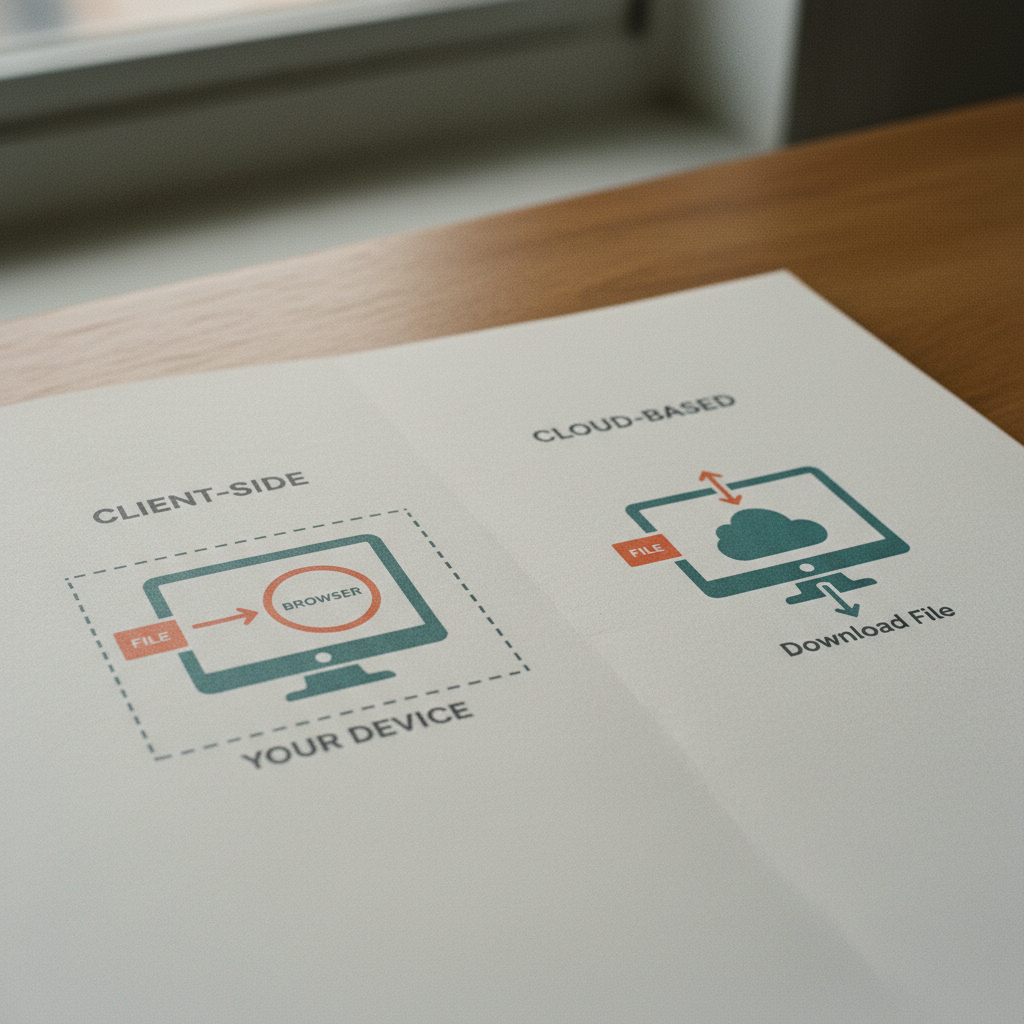
At PDFTSSR, we've built our entire suite of online tools around this privacy-first principle. When you open a PDF with a client-side tool, the file is loaded directly from your computer's hard drive into your browser's local memory. All the editing—whether you're adding text, redacting information, or merging pages—happens right there. The document is never transmitted over the internet or stored on a remote server. When you save your work, it downloads the modified file back to your device. Your contract, invoice, or personal ID never leaves your control.
Understanding the “No Upload” Trust Model: Client-Side vs. Cloud-Based
Not all online PDF tools are created equal. The distinction between 'client-side' and 'cloud-based' processing is the most critical factor for your document's privacy. Understanding this difference is key to making an informed choice, especially when dealing with documents governed by GDPR or containing personal data.
-
Cloud-Based (Server-Side) Tools: Most traditional online tools require you to upload your PDF to their servers. The server then processes the file (e.g., converts, edits, or compresses it) and sends the result back to you. While convenient, this means your document temporarily resides on someone else's infrastructure, creating a copy outside your direct control. For sensitive files, this introduces a potential point of data exposure.
-
Client-Side (In-Browser) Tools: A 'no upload' tool like PDFTSSR works differently. It uses technologies like JavaScript and WebAssembly to run the PDF processing engine entirely within your web browser. The tool loads, the user selects a file from their local disk, and the browser itself performs all the computations. The file is never sent across the network.
Here’s a simple breakdown of the technical trust model:
| Feature | Client-Side Processing (e.g., PDFTSSR) | Cloud-Based Processing (Traditional Tools) |
|---|---|---|
| File Location | Stays on your device, processed in browser memory. | Uploaded to a remote server. |
| Data Transfer | The tool's code is downloaded once; your file is not uploaded. | Your entire file is uploaded and then downloaded. |
| Privacy Risk | Minimal. Your document is never exposed to a third-party server. | Higher. The provider has temporary access to your file. |
| Offline Use | Many tools work offline after the initial page load. | Requires an active internet connection to function. |
Common advice often overlooks this distinction, but for professionals in legal, finance, and HR roles, it’s a non-negotiable security boundary. A truly client-side tool means you don't have to simply 'trust' the provider's privacy policy—you can be technically assured your file remains local.
Which PDF Tasks Can Be Done Without Uploading?
The capabilities of browser-based PDF tools have expanded significantly. You can now perform a wide range of tasks on sensitive documents without them ever leaving your machine. However, it's important to differentiate between standard edits and more complex operations that some 'hybrid' tools might still send to a server.
Common Zero-Upload PDF Functions:
Most core editing and manipulation tasks can be handled entirely client-side. These are the functions you should expect from a privacy-first PDF workspace.
-
Merging & Splitting: Combining multiple PDFs into one or splitting a large document into smaller files are standard client-side operations.
-
Compression: Reducing PDF file size can often be done locally, though some advanced compression algorithms might be server-based. Our own free PDF compressor is designed to run in-browser.
-
Text & Image Editing: Adding, deleting, or modifying text and images within a PDF.
-
Form Filling & Signing: Filling out interactive forms and adding a legally valid electronic signature is a primary use case for secure, local processing.
-
Annotation & Redaction: Highlighting text, adding comments, or permanently blacking out sensitive information.
-
Page Management: Rotating, reordering, and deleting pages within your document.
What About OCR and Advanced Conversions?
Optical Character Recognition (OCR)—the process of converting a scanned, image-based PDF into searchable text—is a computationally intensive task. This is one area where you must be cautious.
-
Truly Local OCR: Some modern tools can perform OCR directly in the browser. This is the most secure option for scanned contracts or invoices containing sensitive data.
-
Server-Side OCR: Many tools, even those that advertise privacy, will upload the document for OCR processing because it requires significant server power. Always check the fine print. If a tool asks for consent before running OCR, it's a sign that your data is about to be sent to a server.
At PDFTSSR, we are committed to transparency. We ensure that our core tools, including sensitive operations like text extraction, are built to run client-side, giving you a clear and consistent privacy guarantee.
The Litmus Test: How to Verify a "No Upload" Claim
Any service can claim 'privacy-first,' but how can you, as a user, verify that your PDF isn't being secretly uploaded? Here are a few practical steps you can take to check a tool's behaviour.
-
Try It Offline: The most reliable test. First, load the online tool's web page while you have an internet connection. Then, disconnect your computer from the Wi-Fi or unplug the ethernet cable. Now, try to open and edit a local PDF file. A true client-side tool will continue to function perfectly, as all the necessary code has already been loaded into your browser. If it throws an error or refuses to work, it relies on a server connection.
-
Monitor Your Network Activity: For the more technically inclined, you can use your browser's built-in Developer Tools. Open the 'Network' tab before you select your file. In a client-side tool, you will see network activity when the page initially loads, but you should see no significant data being uploaded when you open and edit your PDF. If you see your file's data being sent in a POST request, the tool is uploading it.
-
Read the Privacy Policy and Terms of Service: Look for specific language. Vague promises of 'security' are not enough. A trustworthy provider will explicitly state that files are processed locally or 'client-side' and are never transferred to their servers. Be wary of clauses that grant them a license to your 'user-generated content'—a major red flag.
-
**Check for
Use Cases in the UK: When Does Zero-Upload Matter Most?
While any user can appreciate privacy, for certain documents and professions in the UK, using a zero-upload PDF editor is not just a preference—it's a professional necessity.
-
Legal Professionals: Solicitors, barristers, and paralegals handle client-privileged information daily. Using a client-side editor to redact, sign, or annotate contracts, witness statements, and court filings ensures that sensitive case data never leaves the firm's controlled environment.
-
Accountants and Financial Advisors: When working with client tax returns, financial statements, invoices, and payroll records, data security is paramount. A 'no upload' workflow prevents confidential financial data from being exposed on a third-party platform, helping to maintain GDPR compliance and client trust.
-
Human Resources (HR) Departments: Employee contracts, ID scans (like passports and driving licences), disciplinary records, and salary information are all highly sensitive personal data. Processing these documents locally on a company machine using a browser-based tool is a crucial step in a secure HR workflow.
-
Small Business Owners: From drafting proposals and signing supplier agreements to managing invoices, business owners constantly handle confidential commercial information. A secure, accessible tool that requires no installation and guarantees privacy is an invaluable asset for agile operations.
In all these scenarios, the key benefit is de-risking the workflow. By ensuring the document never reaches an external server, you eliminate an entire category of potential data breaches and privacy compliance issues.

Start Editing Your PDFs Securely Today
The need for privacy and security when handling digital documents is no longer a niche concern. It’s a fundamental requirement for modern business and personal administration. The good news is that technology has caught up, and you no longer have to choose between the convenience of an online tool and the security of your desktop.
Client-side PDF editors provide the best of both worlds: powerful, browser-based functionality with the assurance that your sensitive files remain yours and yours alone. Whether you are merging reports, signing a contract, or redacting personal data, a zero-upload tool is the safest, smartest choice.
Ready to experience secure, browser-based PDF editing? Get started with PDFTSSR's suite of 40+ free online PDF tools and take control of your document privacy.
About PDFTSSR
PDFTSSR offers a privacy-first, browser-based suite of more than 40 free PDF utilities. Our mission is to provide a secure online workspace for anyone handling sensitive documents, from contracts and invoices to IDs and legal files. Serving a global market, we specialize in client-side processing, meaning your documents are never uploaded to our servers. All editing, converting, and signing happens directly on your device, ensuring maximum privacy and control.
Frequently asked questions
Is a “no upload” PDF editor really free?
Many client-side PDF editors, including some features from PDFTSSR, are available for free. However, “free” can mean different things. It might mean no cost for a certain number of tasks per day, a file size limit, or access to basic features. Always check the pricing page for clear details on any limitations. Reputable services are transparent about what is free and what requires a subscription.
Can I edit a scanned PDF without uploading it?
Yes, but this depends on the tool’s OCR (Optical Character Recognition) capabilities. To edit a scanned PDF without uploading, the tool must have a client-side OCR engine that runs in your browser. This feature allows you to turn the scanned image into editable text locally. Be aware that many tools perform OCR on their servers, which involves an upload. Always verify this specific feature if you handle sensitive scanned documents.
Is signing a PDF in a browser-based editor legally binding in the UK?
Yes, electronic signatures created in browser-based editors are generally legally binding in the United Kingdom for most types of agreements, thanks to the eIDAS Regulation (which the UK has retained in domestic law). The key is that the signature process captures the intent to sign. For higher-value transactions, you may want a signature with a more detailed audit trail, but for many day-to-day contracts, a simple electronic signature is sufficient and valid.
Do I need to install any software to use a client-side PDF editor?
No. The primary advantage of a browser-based, client-side editor is that there is nothing to install. The entire tool runs within your existing web browser (like Chrome, Firefox, or Safari). You simply visit the website, and the tool is ready to use, making it incredibly convenient for use on any computer without needing administrator permissions.
Will a no-upload PDF editor work on my phone?
Most modern client-side PDF tools are designed to be responsive and should work on mobile browsers. However, the user experience can vary. Simpler tasks like merging, splitting, or signing are often easy to perform on a phone. More complex tasks like detailed text editing or redaction might be easier on a desktop or laptop with a larger screen and a physical keyboard. PDFTSSR is designed to be accessible across devices.
About PDFTSSR
PDFTSSR offers a browser-based suite of PDF tools — a privacy-first, client-side online workspace providing 40+ free PDF utilities such as compressing, merging, splitting, converting, OCR, editing, signing, comparing, and text extraction. It is aimed at people handling sensitive documents (contracts, invoices, IDs, tax forms, client files, and legal PDFs). The company's online presence could not be reliably tied to a specific physical location in the available results.
Expert services sold to organisations — legal, accounting, agency, consultancy, engineering.
request a quote or get in touch with PDFTSSRNext step
Continue with PDFTSSR
PDFTSSR offers a browser-based suite of PDF tools — a privacy-first, client-side online workspace providing 40+ free PDF utilities such as compressing, merging, splitting, converting, OCR, editing, signing, comparing, and text extraction. It is aimed at people handling sensitive documents (contracts, invoices, IDs, tax forms, client files, and legal PDFs). The company's online presence could not be reliably tied to a specific physical location in the available results.
Visit PDFTSSR