Is It Safe to Buy a Microsoft Office Key Online? Your 5-Step Checklist for Nigeria
A practical 5-step checklist for Nigerians to safely buy genuine Microsoft Office product keys online and avoid common risks like fake or stolen licenses.

The Short Answer: Yes, If You Know What to Look For
For many Nigerians looking to equip their computers, the question of buying a Microsoft Office key online is a common one. You see prices far lower than the official Microsoft Store and wonder if it's a legitimate deal or a scam. At Gosoftwarebuy, we help customers navigate this every day. The truth is, it can be perfectly safe to buy a genuine Office license online from a reputable digital retailer. However, it requires you to be an informed buyer. You are not just buying a string of characters (the 'key'); you are purchasing a license to use the software. The biggest risks come from marketplaces and anonymous sellers offering keys at unbelievably low prices, as these are often stolen, counterfeit, or based on misused corporate licenses that can be deactivated by Microsoft at any time.
Step 1: Distinguish Between a 'Key' and a 'License'
This is the most crucial concept to understand. Many risky sellers exploit the confusion between a product key and a software license.
-
A Product Key: This is a 25-character code used to activate the software. It proves to Microsoft's servers that the software copy is not pirated at that moment.
-
A Software License: This is the legal agreement that grants you the right to use the software. It defines how many devices you can install it on, whether you can use it for business, and if you can transfer it to a new computer. A genuine purchase always includes a license.
Microsoft itself warns that it does not distribute product keys as standalone products. A seller offering just a key with no mention of license type (like Retail or Volume), no proper invoice, and no clear terms of use is a major red flag. Successful activation does not guarantee legality. You could activate Office with a stolen or misused key today, only to have it blocked by Microsoft weeks later, leaving you with disabled software and no recourse.
Step 2: Vet the Seller, Not Just the Price
The price of an online Office key can be tempting, often a fraction of what you'd pay directly to Microsoft. But an impossibly low price (e.g., a few thousand Naira for a lifetime license) is the biggest warning sign. Instead of chasing the lowest price, scrutinise the seller.
Here’s a checklist for vetting an online software retailer:
-
Are they a proper business? Look for a professional website with clear contact information, a physical address (even if international), and customer support channels. Avoid sellers on social media marketplaces, forums, or anonymous classified sites.
-
Do they explain what they're selling? Reputable retailers like Gosoftwarebuy clearly state the license type you are buying (e.g., 'Office 2021 Professional Plus, Retail License'). They will have guides explaining the difference between Retail, OEM, and Volume licenses.
-
What do their reviews say? Look for independent reviews on platforms like Trustpilot. Be wary of sites with only perfect, generic reviews. Real customer feedback often mentions the activation process, support quality, and long-term success.
-
Do they have a transparent refund policy? A legitimate seller will have a clear policy for what happens if a key fails to activate or is not as described. If there's no policy, it's a sign they won't stand behind their product.
Step 3: Insist on Redeeming Through Microsoft's Official Portal
This step is non-negotiable for your security. A genuine retail license key for Microsoft Office should be redeemed and tied to your personal Microsoft account.
Here is the only safe process:
-
You receive the 25-character product key from the seller.
-
You go to the official Microsoft redemption website: setup.office.com.
-
You sign in with your own Microsoft account (e.g., your @outlook.com or @hotmail.com address).
-
You enter the key, and the license is permanently added to your account.
Immediate Red Flags:
-
The seller asks for remote access to your computer to perform the activation.
-
The seller gives you a pre-made Microsoft account and password to use. This is almost certainly an illegal, shared account that can be accessed by others and shut down at any moment.
-
You are sent a download link from a non-Microsoft domain or asked to use a third-party 'activator' tool. This is a common way to distribute malware.
By redeeming on setup.office.com, you are confirming the key's authenticity directly with Microsoft before you even install the software.
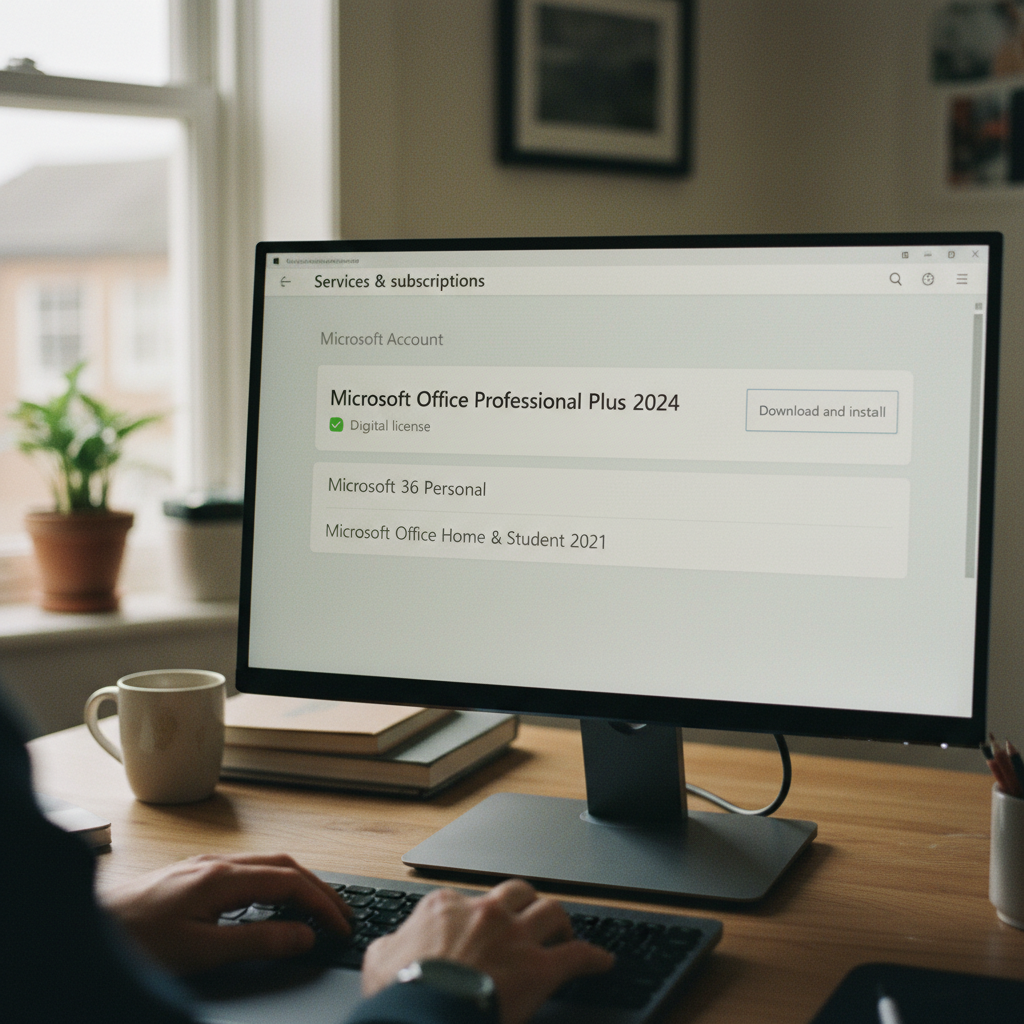
Step 4: Verify the License in Your Microsoft Account Dashboard
After a successful redemption, the license is now part of your digital property. You should be able to see it and manage your installation from your Microsoft account dashboard. This is your ultimate proof of ownership.
How to Verify:
-
Go to account.microsoft.com.
-
Sign in with the same account you used at
setup.office.com. -
Navigate to the 'Services & subscriptions' section.
-
You should see the Microsoft Office product you purchased listed there, for example, 'Office Home & Business 2021'.
From this page, you can always reinstall Office on the same computer or, depending on your license type (Retail licenses usually allow this), transfer it to a new one. If the product does not appear in your 'Services & subscriptions', you don't truly own the license, even if the software seems to be working. For businesses in Nigeria needing to pass a software audit, this verification step is crucial. A key that just 'activates' but isn't tied to a company account will not pass an audit, posing significant legal and financial risk.
Step 5: Understand the Difference: One-Time Purchase vs. Microsoft 365
A common reason Nigerians seek out online Office keys is to avoid the recurring subscription fees of Microsoft 365. It's essential to know what you're buying to ensure it meets your needs.
-
One-Time Purchase (Perpetual License): This includes versions like Office 2024, Office 2021, or Office LTSC. You pay once and own the software forever for use on a single PC or Mac. It receives security updates but does not get major new feature upgrades. This is the most cost-effective option for users who want the core applications (Word, Excel, PowerPoint) and dislike subscriptions. Gosoftwarebuy specialises in these perpetual licenses.
-
Microsoft 365 (Subscription): You pay a monthly or yearly fee (in NGN via local partners or USD directly). You always get the latest features, access to premium cloud services like OneDrive storage, and can often install it on multiple devices. It is a good option for those who need the latest technology and cross-device functionality.
Be extremely cautious of sellers offering 'lifetime' Microsoft 365 accounts. These are typically misused educational or enterprise accounts that violate Microsoft's terms and will eventually be discovered and shut down.
About Gosoftwarebuy
Gosoftwarebuy is an online retailer of genuine Microsoft Office licenses, serving a global customer base. We provide instant download activation keys at competitive prices for home users, students, and businesses. Our specialty is providing clear, legitimate, one-time purchase licenses for products like Office 2024 Professional Plus and Office for Mac, helping customers avoid the uncertainty of online marketplaces and the recurring cost of subscriptions.
Our Take on Online Software Key Purchases
“Navigating the online marketplace for software keys, especially in regions like Nigeria, requires vigilance. We advise customers to prioritize vendors who offer clear licensing terms, immediate digital delivery, and responsive customer support, as these are strong indicators of a legitimate operation. Authenticity is paramount to avoid potential activation issues or security risks down the line.” — the Gosoftwarebuy team
Our Take: Secure Office Key Purchases
“Many users worry about the legitimacy of online software keys, especially with Microsoft Office. Our experience shows that genuine keys are readily available from reputable vendors who source directly from distributors. The key is to verify the seller’s credibility through customer reviews, secure payment options, and clear return policies to avoid counterfeit products and ensure long-term activation stability.” — the Gosoftwarebuy team
Our Expert Opinion on Online Key Purchases
“Many users in Nigeria are concerned about the legitimacy of online Microsoft Office keys. Our experience shows that while official Microsoft channels are always safest, reputable third-party vendors offer genuine keys at competitive prices. The key is thorough verification: always check seller reviews, ensure they provide clear activation instructions, and verify the key directly with Microsoft if possible before relying solely on the seller's claims. Counterfeit keys are a real risk, so due diligence is paramount for securing a legitimate license and avoiding issues down the line.” — the Gosoftwarebuy team
Trusting Online Software Key Purchases
“When purchasing Microsoft Office keys online, especially in regions like Nigeria, the primary concern should always be the legitimacy of the vendor. Many unauthorized resellers offer seemingly attractive prices, but these often come with invalid or previously used keys that can lead to activation issues, security vulnerabilities, and no support from Microsoft. We strongly advise verifying a seller’s reputation, looking for official partnerships, and ensuring they offer clear refund policies to safeguard your investment and data.” — the Gosoftwarebuy team
Our Take on Online Software Purchases
“Navigating the digital marketplace for software licenses can be tricky, especially in regions like Nigeria where numerous vendors operate. Our experience shows that while many legitimate options exist, it’s crucial to prioritize vendors with transparent licensing practices and robust customer support to ensure you’re getting a genuine product key that activates and functions as expected,” — the Gosoftwarebuy team. We always advise buyers to look for clear indications of official partnerships or direct sourcing from publishers. Our commitment is to provide authentic software, ensuring our customers in Nigeria receive reliable products without the risks associated with unauthorized sellers. This approach minimizes potential issues and guarantees peace of mind.
Frequently asked questions
What is the difference between a Retail, OEM, and Volume license key?
A Retail key is purchased from a retailer and can be transferred to a new computer if you replace your old one. An OEM (Original Equipment Manufacturer) key is pre-installed on a new PC and is tied to that specific hardware forever. A Volume license (like MAK or KMS) is meant for large organisations to activate many computers and legally cannot be resold to individual home users. For personal use, a Retail license offers the most flexibility.
Why are keys from Gosoftwarebuy cheaper than from Microsoft?
As a large-scale digital retailer, Gosoftwarebuy sources genuine licenses in bulk from distributors around the world. This allows us to take advantage of regional price differences and pass the savings on to our customers. We provide legitimate Retail and Volume licenses with clear terms, ensuring a safe and cost-effective purchase.
Can I reinstall Microsoft Office if my computer crashes?
Yes, provided you purchased a legitimate license and tied it to your Microsoft account. By logging into your account dashboard at account.microsoft.com, you can see your purchased Office product under 'Services & subscriptions' and re-download the installer at any time. This is a key benefit of buying a genuine license versus a questionable standalone key.
Will a cheap Microsoft Office key work for my business in Nigeria?
It depends on the license. A cheap key sold to an individual that is actually a misused Volume, Student, or OEM key is not legally compliant for business use and will fail a software audit. For business use, you need a proper commercial license. Retail versions of Office Home & Business or Professional, or a proper Volume License, are appropriate. Activation alone is not enough; you need proof of a legitimate license.
How can I check if my existing Office key is genuine?
The best way is to try to add it to a Microsoft account at setup.office.com. If it's a legitimate, unused retail key, it will be added to your account. You can also check your 'Services & subscriptions' page on account.microsoft.com. If your Office purchase is listed there, it is genuine. On a Windows PC, you can also open Command Prompt and run cscript "C:\Program Files\Microsoft Office\Office16\OSPP.VBS" /dstatus to see detailed license information, like 'RETAIL channel' or 'VOLUME_KMS channel'.
About Gosoftwarebuy
Online retailer of genuine Microsoft Office licenses and instant download activation keys at competitive prices.
Expert services sold to organisations — legal, accounting, agency, consultancy, engineering.
request a quote or get in touch with GosoftwarebuyNext step
Continue with Gosoftwarebuy
Online retailer of genuine Microsoft Office licenses and instant download activation keys at competitive prices.
Visit GosoftwarebuyWritten with information published by Gosoftwarebuy.
Keep reading
Don't get stuck with the wrong Microsoft Office license. Our guide explains Retail, OEM, and Volume keys so you know what you're buying before you activate.
A guide for users in Ghana on how to reinstall and transfer a one-time purchase Microsoft Office license (Retail vs. OEM) to a new PC.
En steg-för-steg-guide för att aktivera din Microsoft Office 2024, 2021 eller Office för Mac-produktnyckel via office.com/setup. Få hjälp med nedladdning och installation.
Worried about your Office 2024 one-time purchase? Learn how perpetual licenses get security updates until 2029, using the August 2026 patch as an example.